
Filters
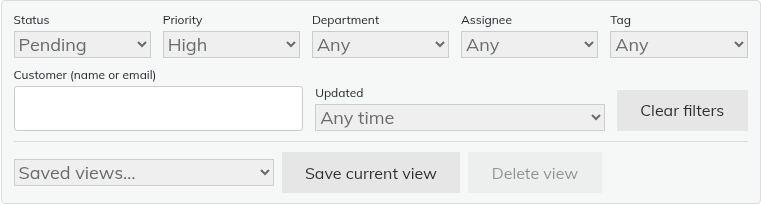
The filter bar sits above the list on the Agent Dashboard. You can filter by:
- Status, priority and department
- Assignee, including Unassigned
- Tag
- Customer (name or email)
- Updated: Any time, Last 24 hours, Last 7 days or Last 30 days
- Organisation and Team. These only appear if you have organisations or teams.
Click "Clear filters" to start again. The dashboard also remembers your last tab, search and filters in that browser, even if you have not saved a view.
Save a view
- Set your filters.
- Click "Save current view".
- Type a name in "View name" and click "Save".
- The view appears in the "Saved views…" drop-down under "My views".
To remove a view, select it and click "Delete view".
Personal and shared views
- Personal views are just for you.
- Shared views appear for every agent, under "Shared views".
- Only administrators can create or delete shared views. Support Agents never can, and it is not one of the per-agent permissions. Administrators see a "Share with all agents" tick box when saving.
Limits
Each agent can have 50 personal views. There can be 50 shared views. A name can be up to 60 characters.
Still stuck? Open a ticket on the support page on ABC and a real person will help.
Was this article helpful?