
Which emails are sent
- A confirmation to the ticket owner when a ticket is opened.
- "New ticket assigned to you" to the agent a ticket is assigned to.
- "New reply" to everyone watching the ticket except the person who wrote it. The customer counts as a watcher of their own ticket.
- "Internal note added" to agent watchers only. Customers never receive internal notes.
- "Updated" to everyone watching except the person who made the change, when status, priority, department, assignment or tags change.
- Team emails for tickets routed to a team, if you switch them on under Helpdesk > Teams.
Nobody is emailed about their own actions. All emails are sent as HTML with a plain-text version. Subjects look like "[Ticket #12] New reply: Subject".
The wording of the emails is fixed. There is no template editor. The emails contain the text only and no link to a page on your site.
Everyone can switch some emails off for themselves. See "Choosing which emails you receive".
From name and address
- Go to Helpdesk > Settings. There are no tabs, so scroll to the "Email Notifications" section.
- Set the "From name" (for example ABC Support) and the "From address".
- Use an address on your own domain, for example support@yourdomain.com.
- Click "Save Email Settings".
The email health check
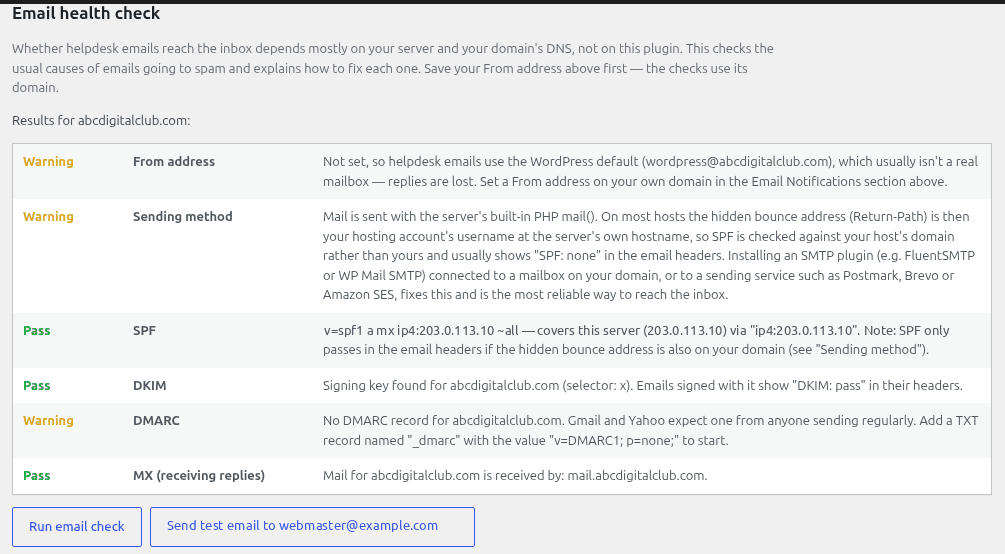
Just below, the "Email health check" has two buttons: "Run email check", and "Send test email to" followed by your address. The check reports Pass, Warning, Fail or Info for your From address, sending method, MX (receiving replies), SPF, DKIM and DMARC. If your host blocks DNS lookups, you will see an Info note about the DNS checks instead.
Fixing what it flags
| Flag | Fix |
|---|---|
| Sending method | Install an SMTP plugin and send through your email provider. |
| SPF | Add your email provider to your domain's SPF record. |
| DKIM | Turn on DKIM in your email provider and add the DNS record it gives you. |
| DMARC | Add a DMARC record, starting with p=none. |
| MX | Make sure your From domain can receive mail. |
DNS changes are made with your domain host and can take a few hours to work. Ticket text travels through your site's mail system, so choose a mail provider you are happy with. If emails still do not arrive, see "Troubleshooting: emails not arriving".
Still stuck? Open a ticket on the support page on ABC and a real person will help.
Was this article helpful?