
Extensions are separate plugins you install the same way as HelpDesk WP. Each needs HelpDesk WP 2.9.0 or newer. If the core plugin is missing or too old, the extension does nothing and shows a notice.
| Extension | Helpdesk menu item | What it adds |
|---|---|---|
| SLA | SLA Policies | Response and resolution targets by priority, with breach alerts. See "SLA targets and breach alerts". |
| Workflows | Workflows | Automation rules. See "Workflows automation rules". |
| Reports | Reports | Summary figures, a per-agent table and daily ticket volume. See "Reading the Reports extension". |
| CSAT | CSAT | A 1 to 5 star rating request after a ticket is solved. See "Collecting satisfaction ratings with CSAT". |
| Webhooks | Webhooks | Sends ticket events to other apps, signed and HTTPS only. See "Sending ticket events with Webhooks". |
| Email Piping | Email Piping | Turns emails into tickets. See "Email Piping: tickets by email". |
| Paid Support (License Gate) | Paid Support, Support plans, Payments | Sells support plans with PayPal, or limits support to people who qualify. See "Paid Support: selling support plans with PayPal". |
Install an extension
- Download the .zip from the link you were given when you got the extension.
- Go to Plugins > Add New Plugin > Upload Plugin and install it.
- Activate it.
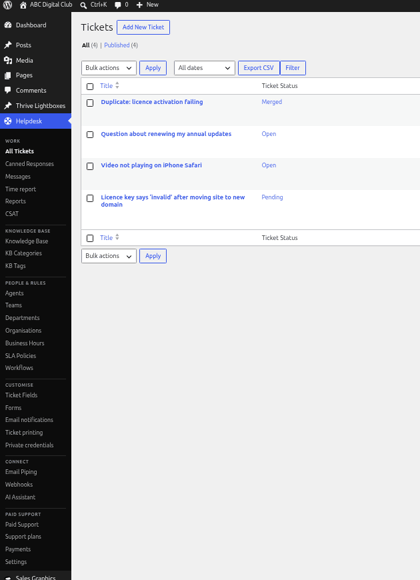
- Open the Helpdesk menu in wp-admin. The extension has its own item there (see the table). There is no combined "Extensions" page and nothing extra under Helpdesk > Settings.
You need the manage-settings permission, which administrators have, to see and use these pages.
Extensions have no licence screen
Extensions have no licence key field of their own to activate. The licence in Helpdesk > Settings is for HelpDesk WP itself. See "Licence, updates and what happens when it expires".
Scheduled tasks
SLA breach checks, workflow inactivity checks, webhook deliveries, Email Piping and Paid Support reminders all run on WordPress's built-in scheduler (WP-Cron). WP-Cron only runs when someone visits your site, so on a quiet site these tasks can run late. Ask your host to run a real server cron job instead. See "Email Piping: tickets by email" for the steps.
Still stuck? Open a ticket on the support page on ABC and a real person will help.
Was this article helpful?