
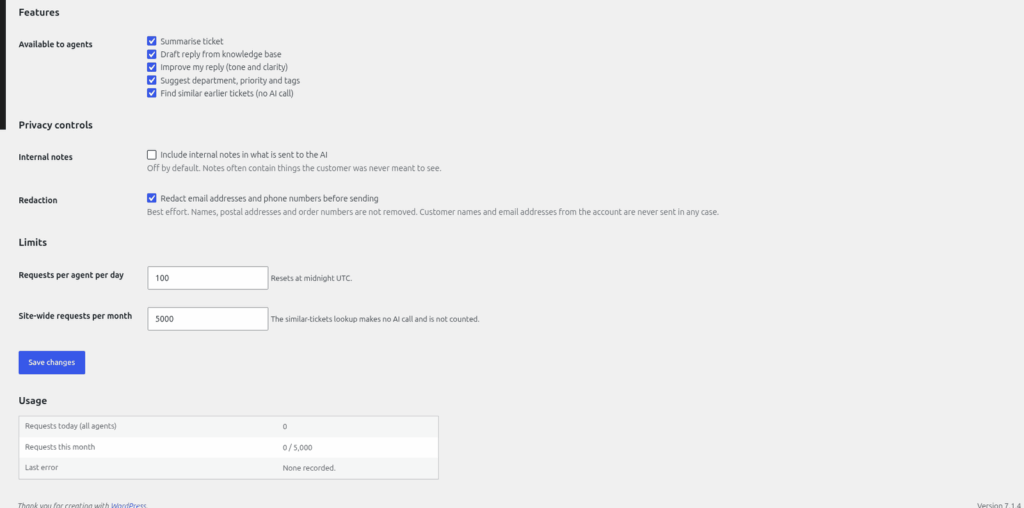
Everything on this page is set under Helpdesk > AI Assistant, in the "Privacy controls", "Limits" and "Usage" sections.
What is sent
Each time an agent uses an AI button, HelpDesk WP sends your provider the ticket subject, the customer's original message and up to 60 replies. Attachments are never sent. The names and email addresses of the people on the ticket are never sent either; messages are labelled only "Customer" or "Agent reply".
Privacy masking
- "Redact email addresses and phone numbers before sending" is ticked by default. Email addresses become "[email removed]" and phone numbers become "[phone removed]". Short local numbers (under 9 digits), dates and IP addresses are left alone.
- Masking is best effort. Names that someone types into the ticket text are not masked, and neither are postal addresses or order numbers.
- "Include internal notes in what is sent to the AI" is off by default. If you tick it, up to 30 internal notes are sent as well.
Think before you tick the internal notes option: notes often contain more detail than the conversation.
Usage limits
In the "Limits" section:
| Setting | Default | Resets |
|---|---|---|
| Requests per agent per day | 100 | Midnight UTC |
| Site-wide requests per month | 5000 | Start of the month, UTC |
Both must be at least 1. When a limit is reached, the agent sees a message and no request is sent. "Similar tickets" is not counted. Requests that fail at the provider do count.
The usage log
The "Usage" box shows "Requests today (all agents)", "Requests this month" and "Last error". Below it, "Recent requests" lists the latest ones. The log never stores what was sent or what came back. It does keep the last 200 requests with the time, agent, ticket number, feature, provider, token counts and status.
The log is included when you export or erase an agent's personal data. See "GDPR: exporting and erasing personal data".
Still stuck? Open a ticket on the support page on ABC and a real person will help.
Was this article helpful?