
Add an agent
- Go to Helpdesk > Agents. The page is headed "Support Agents".
- Choose the person in "User" and tick "This user is a support agent".
- Click "Save Agent".
- Click "Edit" next to the person. The "Permissions" tick boxes and the "Departments covered" box now appear.
- Tick the permissions you want and save.
You can also give someone the Support Agent role under Users, but the Agents screen is the intended route. Agents can then use the Agent Dashboard. A WordPress Contributor or Editor does not become an agent just by logging in: they must be made a Support Agent here. Administrators can be agents too, and they are included when tickets are auto-assigned.
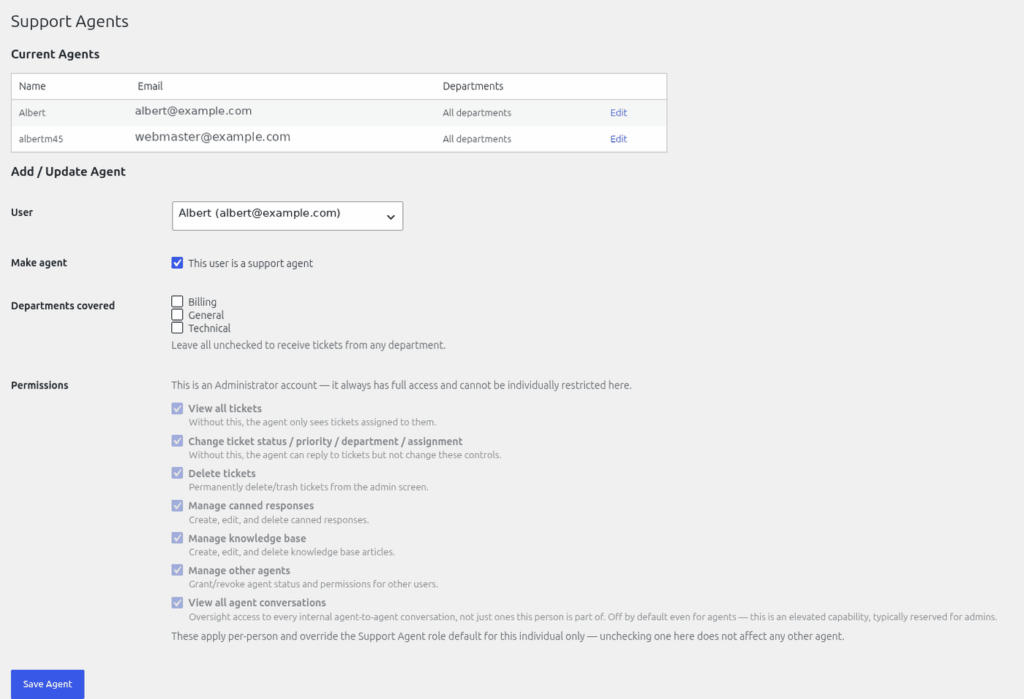
The seven permissions
| Permission | Lets the agent | New agent default |
|---|---|---|
| View all tickets | See every ticket. Without it an agent sees only tickets assigned to them, and the dashboard shows only the "Assigned to me" tab. | On |
| Change ticket status / priority / department / assignment | Edit those fields on any ticket, and merge tickets. | On |
| Delete tickets | Permanently delete or trash tickets from the admin screen. | On |
| Manage canned responses | Add, edit and delete canned responses. | On |
| Manage knowledge base | Write and edit knowledge base articles, and save category icons. | On |
| Manage other agents | Open the Agents screen and change other agents' permissions. | Off |
| View all agent conversations | Read other agents' messages (oversight). | Off |
"Manage other agents" is off for Support Agents by default, so ordinary agents cannot open the Agents screen.
Administrators
WordPress Administrators always hold every helpdesk permission, whatever is stored on their account (from version 2.12.5). They cannot be restricted. Some things belong to administrators only and are not among the seven: Helpdesk > Settings, Departments, the module and extension pages, and shared saved views.
If someone is told they have no permission
See "Fixing 'you do not have permission' for an administrator or agent".
Still stuck? Open a ticket on the support page on ABC and a real person will help.
Was this article helpful?