
HelpDesk WP has two places where tickets appear, and they do different jobs. Knowing which to use saves a lot of hunting for a reply box that is not there.
The Agent Dashboard (where you work tickets)
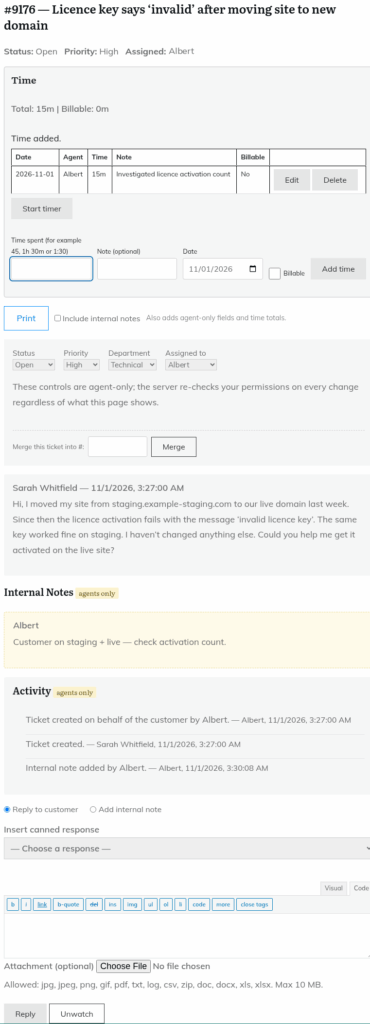
The Agent Dashboard is the page on your site that holds the
Please log in to use the support desk. Log in
shortcode. Agents who visit it see the Agent Dashboard with the ticket tabs. Click a ticket and it opens on the same page. On that ticket screen you can:- Reply to the customer with the "Reply" button, or switch to "Add internal note".
- Insert a canned response from the "Insert canned response" drop-down.
- Change Status, Priority, Department and "Assigned to" (this needs the "Change ticket status / priority / department / assignment" permission).
- Merge the ticket into another with "Merge this ticket into #:".
- Watch or unwatch the ticket, and read the "Internal Notes" and "Activity" sections.
Helpdesk > All Tickets (the admin list)
Helpdesk > All Tickets in wp-admin is the standard WordPress list. It has no reply box. Use it to:
- Search tickets by subject and message text.
- Export every ticket you are allowed to see with "Export CSV".
- Trash or delete tickets in bulk, if you have the "Delete tickets" permission.
- Open the WordPress editor for a ticket, which has the "Ticket Fields" box when the custom fields module is in use.
Quick reference
| I want to… | Go to… |
|---|---|
| Reply, add a note, change status, merge, watch | The Agent Dashboard page |
| Create a ticket for a customer | The ticket form page, using "Create on behalf of (optional)" |
| Search subject and message text, export CSV, delete in bulk | Helpdesk > All Tickets |
| Set up agents, departments and settings | The Helpdesk menu in wp-admin |
Do not use the wp-admin "Add New Ticket" screen to log tickets. It is only the bare WordPress editor, so it skips status, assignment and notification handling. See "Creating a ticket on behalf of a customer".
If you cannot find the Agent Dashboard
Someone needs to create a page with
Please log in to use the support desk. Log in
. See "Setting up your support pages with shortcodes". For the dashboard tabs, see "The agent dashboard, tabs and watching tickets".Still stuck? Open a ticket on the support page on ABC and a real person will help.
Was this article helpful?