
Log time on a ticket
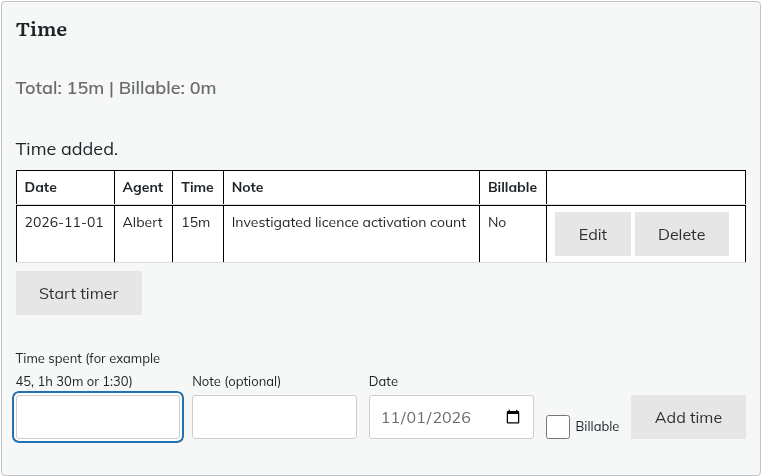
Agents who can edit a ticket see a panel headed "Time" under the ticket header.
- Open the ticket and find the "Time" panel.
- In "Time spent", enter the time. Any of these work: 45 (minutes), 45m, 1h 30m, 1h30, 1.5h, 2h or 1:30.
- Add a "Note (optional)" of up to 200 characters.
- Choose the "Date". It cannot be in the future.
- Tick "Billable" if you will charge for it.
- Click "Add time".
Each entry can be from 1 minute to 24 hours. The panel lists the entries with the Total and Billable totals.
You can edit or delete your own entries. Administrators can edit or delete any entry.
Using the timer
- Click "Start timer" when you begin.
- Click "Stop timer" when you finish. This does not save anything yet. It fills the "Time spent" field with the elapsed time.
- Adjust the note, date or "Billable" if needed, then click "Add time".
A running timer is remembered in that browser only, so it does not follow you to another computer.
Who sees it
Agents only. Time is never shown to customers and is never part of what the normal ticket API returns. Agents have separate, agent-only API endpoints for it.
The time report
Only administrators can open the report.
- Go to Helpdesk > Time report.
- Choose "From", "To", "Agent" and "Billable" (All, Billable only or Non-billable only).
- Choose how to group the results: Agent, Ticket or Day.
- Click "Show report".
- Click "Export CSV" to download it.
Privacy
Time you logged as an agent is included when that agent is exported, and anonymised when they are erased (your name and note are removed, the time is kept for reporting). If a customer is erased, the time entries on their tickets are deleted. See "GDPR: exporting and erasing personal data".
Still stuck? Open a ticket on the support page on ABC and a real person will help.
Was this article helpful?