
The Webhooks extension sends a short message to a web address of your choice whenever something happens to a ticket. Use it to connect HelpDesk WP to Zapier, Slack, or your own app.
Add a webhook
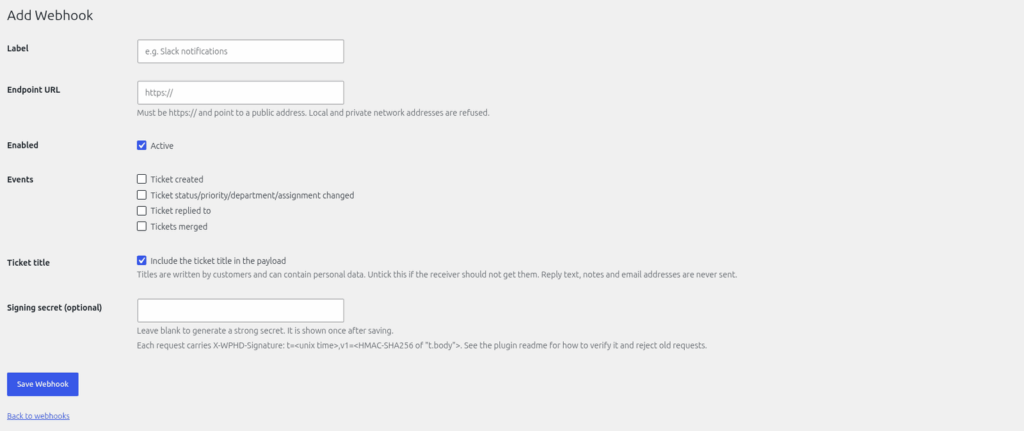
- Go to Helpdesk > Webhooks and click "Add New".
- Type a "Label" so you can recognise it.
- Enter the "Endpoint URL". It must start with https:// and be on the public internet. Local and private addresses are refused.
- Keep "Enabled" ticked ("Active").
- Choose the "Events" you want.
- Decide whether to tick "Include the ticket title in the payload". Customers write ticket titles, so a title can contain personal details. Untick it if you do not want titles to leave your site.
- The "Signing secret" is shown once. Copy it now. Use "Generate a new secret" to replace it later. If you choose your own, make it at least 16 characters.
- Save, then click "Send test" to send a signed ping.
Events
| Event | When |
|---|---|
| ticket_created | A ticket is created. |
| ticket_updated | An agent changes a ticket. Adds a "changes" list such as "Status changed." |
| ticket_replied | A reply is added. Adds comment_id, never the reply text. |
| tickets_merged | Two tickets are merged. Adds primary_ticket_id and secondary_ticket_id. |
What is sent
Names, email addresses, reply text, internal notes and custom fields are never sent. The message is JSON with these fields: event, site, occurred_at, ticket (id, status, priority, url and, unless you unticked it, title) and ticket_id, plus the extras for the event. The ticket url is a link for people who can edit tickets in wp-admin.
Delivery and retries
A delivery is tried up to 5 times in all: the first try, then retries after 1 minute, 5 minutes, 30 minutes and 2 hours. Only network errors and the answers 408, 429 and 5xx are retried; any other 4xx answer is final. Deliveries run on WP-Cron, so a real server cron keeps them on time. A delivery log keeps the last 100 attempts, without the contents.
Verify the signature (for developers)
Every request has three headers:
- X-WPHD-Event: the event name.
- X-WPHD-Delivery: an ID that is the same on every retry. Use it to ignore duplicates.
- X-WPHD-Signature: t=<unix time>,v1=<hex>
To check it:
- Read t and v1 from the header.
- Compute an HMAC-SHA256 of the text t, then a full stop, then the raw request body, using your signing secret as the key. Write the result in hex.
- Compare it with v1.
- Reject the request if t is more than 5 minutes old.
Always use the raw body exactly as received, before any JSON parsing.
Still stuck? Open a ticket on the support page on ABC and a real person will help.
Was this article helpful?