
Use this when a customer phones or emails you directly and you want the conversation in the desk.
Steps
- Log in as an agent and open your ticket form page (the page with
Please log in to use the support desk. Log in
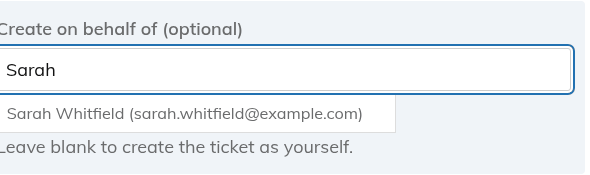
, for example Support). - In "Create on behalf of (optional)", type at least two letters of the customer's name or email in "Search customer by name or email…" and pick the person from the list.
- Fill in the subject and message, and choose the department and priority.
- Click "Submit Ticket" (or whatever the form's submit button says).
There is no "New ticket" button on the Agent Dashboard. Do not use the wp-admin "Add New Ticket" screen for this: it is only the bare WordPress editor and skips status, assignment and notifications.
What happens
- The ticket belongs to the customer, so they see it in My Tickets and get the usual email updates, starting with the confirmation.
- An internal note is added automatically saying which agent created it. It appears as a note, not in the Activity list.
- Agents are not held back by the ticket rate limit.
The customer must already have an account
You can only pick a registered WordPress user. The search looks through existing users by login, email or display name, and there is no way to type in a brand-new email. If the customer has no account:
- Create one first under Users > Add New, then search for them.
- Or let them submit a guest ticket, which creates the account for them. See "Allowing guest tickets".
If you leave the field blank, the ticket is created as yourself.
Still stuck? Open a ticket on the support page on ABC and a real person will help.
Was this article helpful?