
Add the page
Create a page, for example called "Knowledge base", and put the shortcode
How can we help?
No articles found.
The page's address becomes your knowledge base address. See "Changing your knowledge base web address (/kb/ or /knowledge-base/)".
Choose a layout and colour
Settings is one page with headed sections, not tabs.
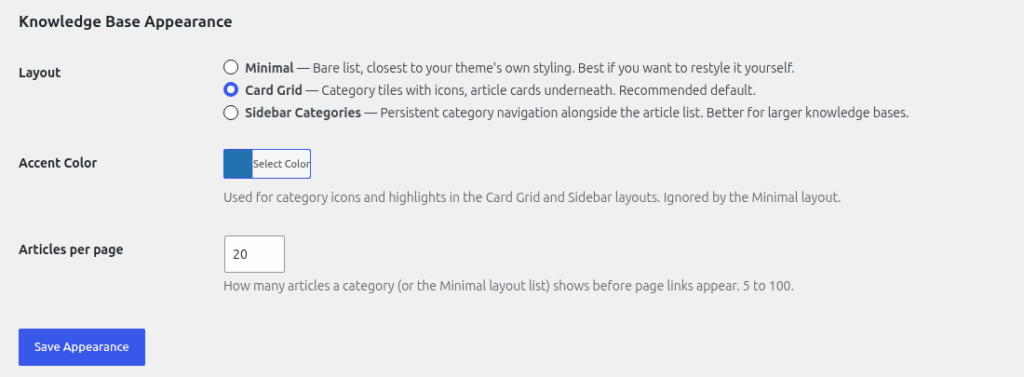
- Go to Helpdesk > Settings and scroll to "Knowledge Base Appearance".
- Choose a "Layout":
- Minimal: lists articles straight away.
- Card Grid: shows categories as cards. Articles appear once a category is chosen.
- Sidebar Categories: shows categories down the side. Articles appear once a category is chosen.
- Set "Accent Color" to match your brand.
- Set "Articles per page", from 5 to 100. The default is 20.
- Click "Save Appearance".
Paging
When a list has more articles than "Articles per page", Previous and Next links appear at the bottom. The address gets ?kb_page=2 and so on. Page 1 uses the plain address.
Styling
The knowledge base follows your theme's fonts and colours. The only colour HelpDesk WP controls is the accent colour.
Seeing what readers think
Under Helpdesk > Knowledge Base, the "Helpful" column shows the answers to "Was this article helpful?" for each article. See "Live search, article feedback and related articles".
Still stuck? Open a ticket on the support page on ABC and a real person will help.
Was this article helpful?