
Sometimes support needs a login to fix a problem. Private credentials gives customers a safer place to put it than the message text. The feature is off until an administrator turns it on.
Set it up
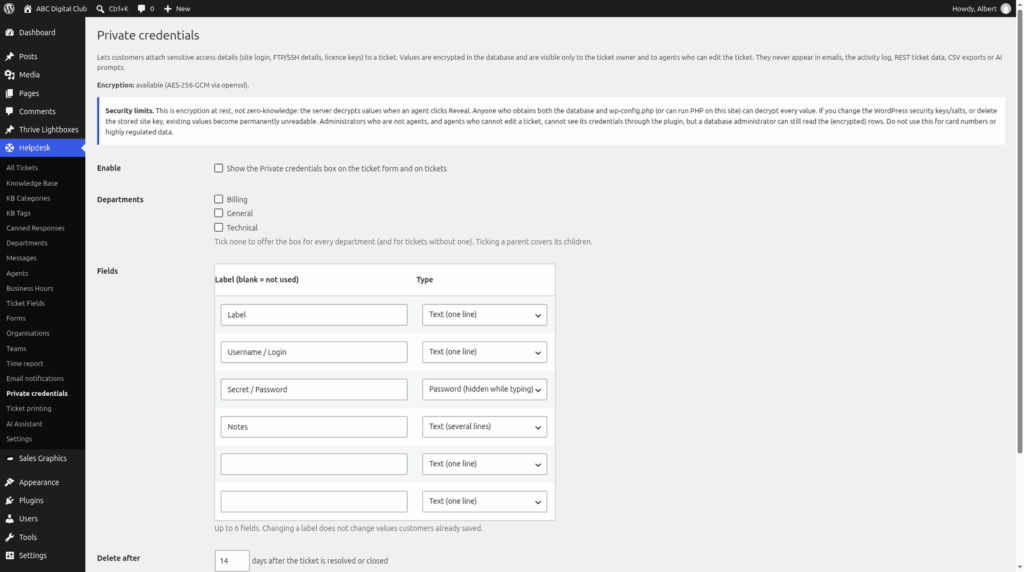
Go to Helpdesk > Private credentials and choose:
- "Enable": switches the feature on.
- Departments: tick the departments that can use it. Tick none to allow all. A parent department covers its children.
- Fields: up to 6, each with a label and a type: Text (one line), Password (hidden while typing) or Text (several lines). The defaults are "Label", "Username / Login", "Secret / Password" and "Notes".
- "Delete after": the number of days after a ticket is resolved or closed when the values are deleted. The default is 14. Use 0 to keep them until someone wipes them. A daily WordPress task does the clearing.
- "Agents must click Reveal to see values": on by default.
For customers
A logged-in customer sees an optional, collapsible box, "Private credentials (optional)", on the ticket form. Later, on the ticket, they can add or replace values ("Save credentials"), look at them ("Show my saved values") or remove them ("Delete all my credentials"). A value can be up to 500 characters, or 4000 for the multi-line type.
For agents
Only the ticket owner and agents who can edit that ticket can see the values. Agents click Reveal to see them, and they hide again after 60 seconds. Agents can also wipe them with "Wipe now". An access log records every reveal, save and wipe, and the activity timeline notes when credentials are viewed.
How it is protected
- Values are encrypted before they are stored (AES-256-GCM). If the server cannot do this, the feature switches itself off rather than store anything as plain text.
- Values are kept out of the ticket API, CSV exports, notification emails, AI requests and search.
- The personal data export lists which fields exist, never the values. Erasing a ticket or a customer wipes them.
- It is not zero-knowledge. The server decrypts a value when someone clicks Reveal.
- If someone changes the site's WordPress security salts, saved values become unreadable.
Do not use it for card numbers or other highly regulated data.
Still stuck? Open a ticket on the support page on ABC and a real person will help.
Was this article helpful?